Your Depth Chart Shouldn't Live on a Whiteboard
FEATURE FRIDAY EDITION 01 • DEPTH CHART + GAME-DAY ROSTER
You built the depth chart all week.
Why are you still building the roster from scratch on game day?
This is Feature Friday a weekly look at what ScoutSync actually does, built from real conversations with coaches across football, basketball, soccer, lacrosse, and baseball. Every problem described below was reported by a working coach. None of it is hypothetical.
PART 1 — THE PAIN
The last mile is always manual. On every platform.
Ask any coach who has managed a game-week roster and you will hear the same story. Monday through Thursday, the depth chart is alive. Personnel changes, injury updates, scheme adjustments all of it tracked, all of it managed. Then Friday comes. Game day comes. And the document that has to actually exist the one you hand to the officials, the opposing coach, the scorer’s table, the athletic director that document does not exist yet.
Because no platform built it for you.
You open Word. You open Google Docs. You open the spreadsheet you built three seasons ago that you’ve been updating ever since because nothing else does the job. You re-enter names that already live in your roster tool. You re-format. You re-verify. You print. And if a player goes down in warmups, you start over.
"We use Hudl for everything during the week but on game day I still have to build the official roster in a separate Word doc. Hudl doesn’t give you a print-ready roster with jersey numbers and positions formatted for the officials table. It’s a 30–45 minute job every single Friday night."
— High school football coach, r/footballcoaching
"My depth chart is in one system, my official roster for IHSAA submission is in another spreadsheet, and what I hand the opposing coach before kickoff is a third document. I’m maintaining three versions of the same information every week."
— High school football coach, CoachTube community
Three documents. One source of truth that doesn’t actually exist in any of them. That is the status quo.
It is not a Hudl problem or a TeamSnap problem. It is an industry problem.
This is not a criticism of any one platform. Coaches who have evaluated multiple solutions report the same gap across the board.
"Went through four different platforms in three years looking for one that would let me manage my depth chart and then just print an official roster for the scorer’s table. They all stop short. You’re always doing the last step yourself."
— College basketball coach, NABC coaches forum
"Honest question for coaches: how are you still generating your official game-day roster? Mine is a Word doc I update every week. I’ve never found a platform that goes all the way from depth chart to printable official roster in one step."
— Coach, X (formerly Twitter) coaching community thread
"They all stop short." That is a direct quote from a coach who spent three years looking for a solution. It is the most accurate description of the current market we have heard.
PART 2 — THE REAL COST
The seven manual steps coaches do every game week that they should not have to do.
Here is the honest breakdown of what game-day roster preparation actually looks like across most programs today. This is not edge-case behavior. This is the norm.
Step
Action
The problem
1
Build the depth chart
Done in a whiteboard, spreadsheet, or a basic tool. This part is fine.
2
Update throughout the week
Injuries, transfers, suspensions — manually updated, usually in one place only.
3
Prepare the official game roster
Open a separate document. Re-enter names, numbers, positions, eligibility. From scratch.
4
Format for print
Adjust layout, margins, font size. Make it look like something you can hand to a human being.
5
Verify accuracy
Cross-check the new document against the roster tool — which may already be outdated.
6
Distribute
Print for officials, opposing coach, AD, press box, sideline staff. Multiple copies.
7
If anything changes pre-game
A player is scratched in warmups. Return to Step 3.
Every step after Step 2 is administrative overhead built on top of a tool that already has all the information. The cognitive work is done. The personnel decisions are made. The document generation is still a manual job.
"My lineup card is always the last thing I do before a game and it’s always manual. I know my depth chart. I know who’s pitching. But there’s no software that goes from ‘here’s my roster and depth assignments’ to ‘here’s your printed lineup card.’ You do it in your head and write it down."
— Baseball coach, Perfect Game coaches community
This is not a football problem. It is not a baseball problem. It is a sports management software problem that exists across every sport, every level, and every platform in the market right now.
"SportsEngine lets me manage my roster all season but when I need the official lineup card for the referee before kickoff, I’m writing it by hand or typing it into a separate template. There’s no ‘generate lineup card’ button anywhere."
— Soccer coach, United Soccer Coaches forum
"We had a kid get injured warming up 20 minutes before game time. Scratching him from the official roster meant going back to the coordinator, reprinting, and re-submitting to the table. If the roster existed live in one system we could update and reprint in 2 minutes. Instead it took 15."
— Lacrosse coach, US Lacrosse coaching network
15 minutes. Pre-game. For a document that could have been regenerated in seconds from data that was already there.
PART 3 — THE OUTCOME
What happens when the depth chart is the roster.
When your personnel management system and your game-day documentation are the same system, the workflow collapses. Here is what that looks like in practice:
BUILD IT ONCE
Assign players to position slots within each scheme. Offensive, defensive, special teams. That assignment is the data. It does not live in a separate document.
MANAGE IT LIVE
When a player is injured on Thursday, update it once. The depth chart reflects it. The export reflects it. Every downstream document reflects it. No manual cascade across three separate files.
EXPORT IT READY
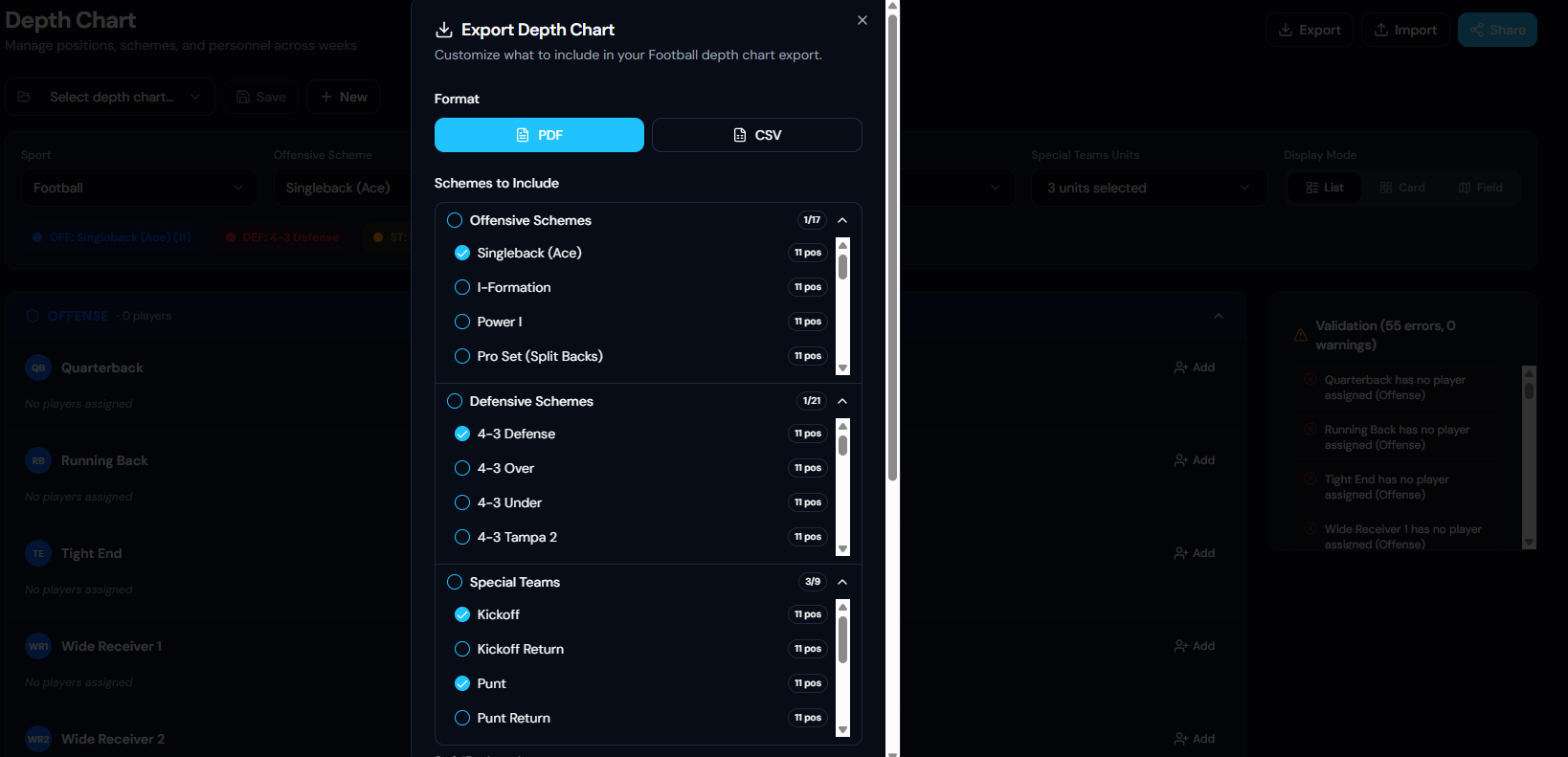
On game day, hit Export, choose PDF, select which schemes to include, and the formatted document is ready. The same data your staff worked with all week is the document you hand to the official.
NO RETYPING. NO REFORMATTING. NO “WAIT, IS THIS THE UPDATED VERSION?”
The document you hand to the referee is generated from live data. It cannot be out of date unless your depth chart is out of date.
"ArbiterSports handles assignments and officials fine but from a coach perspective it does nothing for me in terms of generating what I need to hand the referee. That document still comes from a Google Sheet I built myself three seasons ago."
— Soccer coach, Reddit r/soccercoaching
That Google Sheet should not need to exist. The data is already in your system. The document should generate from it.
PART 4 — THE PRODUCT
What ScoutSync’s Depth Chart tool actually does.
The ScoutSync Depth Chart is a live personnel management system. Not a visual chart that ends at the screenshot. Here is the full capability breakdown:
Multi-scheme management
Build and manage separate depth charts for every offensive, defensive, and special teams scheme simultaneously. Singleback, I-Formation, Power I, 4-3 Defense, 4-3 Over, 4-3 Tampa 2, Kickoff, Punt, Punt Return every scheme your program runs, organized in one place. Your full playbook, not a single chart.
Scheme-specific position slots
Each scheme carries its own position slots. Player assignments are tied to the specific scheme and position not a generic roster slot. This means your depth chart reflects actual schematic context, not just a name on a list.
Live validation before the document leaves your hands
The system runs real-time validation and surfaces gaps before export. Empty position slots, unassigned starters, incomplete units you see every error before you hand anything to anyone. Not after.
Three display modes
Toggle between List, Card, and Field views depending on what you need. Tactical film prep calls for a different view than a quick personnel check before the bus leaves. All three are available.
Special teams as a first-class feature
Kickoff, Kickoff Return, Punt, Punt Return each managed as a separate unit with its own position assignments. Special teams is not an afterthought appended to the offensive depth chart.
Export to PDF or CSV
PDF for the officials table, visiting team, AD, or press box. CSV for scorekeeping systems, internal reporting, or staff distribution. Both formats available from the same live data.
Selective scheme export
Choose exactly which schemes are included before you export. Export only the active roster for the officials. Export only special teams for your coordinator. Do not hand the other team your full playbook when you only need to hand them a name list.
Version control and week-over-week tracking
Save named depth chart versions and create new ones without overwriting previous configurations. Track how your depth has evolved across the season. Support roster decisions with history, not just the current snapshot.
Import and staff sharing
Import existing depth chart data instead of rebuilding from scratch. Share live access with coordinators and position coaches so every staff member is working from the same current version not emailing attachments back and forth.
PART 5 — WHO THIS IS FOR
The payoff by role.
Role
The payoff
Head coach
Full picture across all schemes offense, defense, special teams from one view. Game-day roster generated without opening another application.
Coordinator / position coach
Manage your unit’s depth independently, without waiting on a spreadsheet update from someone else. Export only your unit when needed.
Recruiting coordinator
Identify gaps by position directly from the depth chart. Recruiting targets map to roster needs in the same system, not a separate analysis.
College programs
Multi-scheme depth chart management at the speed roster decisions actually happen. Transfer portal additions visible against existing depth immediately.
Club and academy programs
Structure personnel across multiple teams and formats. One system, not one spreadsheet per team.
See it for yourself.
Stop building the same document twice every week. Your depth chart is already in the system. Your game-day roster should come from it.
▶ Try it: scoutsynconline.com
▶ Request a walkthrough: contact@scoutsync.com
Next Feature Friday: ScoutSync Schedule Import — how a global team library and auto-classification system replaces the 4-hour pre-season schedule entry process.
ScoutSync Online — scoutsynconline.com • contact@scoutsync.com • © 2026 ScoutSync