Feature Friday: Stop Juggling, Start Organizing : Events & Scheduling on ScoutSync
Feature Friday: Stop Juggling, Start Organizing : Events & Scheduling on ScoutSync

If you're running a sports program, here's what "managing events" really looks like today:
You're managing practice times through a group text thread. Game schedules live in a shared Google Calendar that nobody remembers to update. Rosters are in a spreadsheet. Registration is on a completely separate platform. And combine or tryout signups? Paper waivers, clipboard check-in, and numbered pinnies.
Seventy-eight percent of school administrators use three or more separate systems to manage athletics that's according to Arbiter's industry data. And the average athletic director loses roughly 10 hours every single week to administrative inefficiencies alone. Just logistics.
For families, the Aspen Institute's Project Play survey found the average sports parent spends 3 hours and 23 minutes every day their child has a practice or game roughly an hour of that is pure logistics. Driving. Communicating. Coordinating.
You're not running a program. You're running a patchwork of disconnected tools that don't talk to each other.
This is fragmentation. And it's costing your program time, data, and continuity.
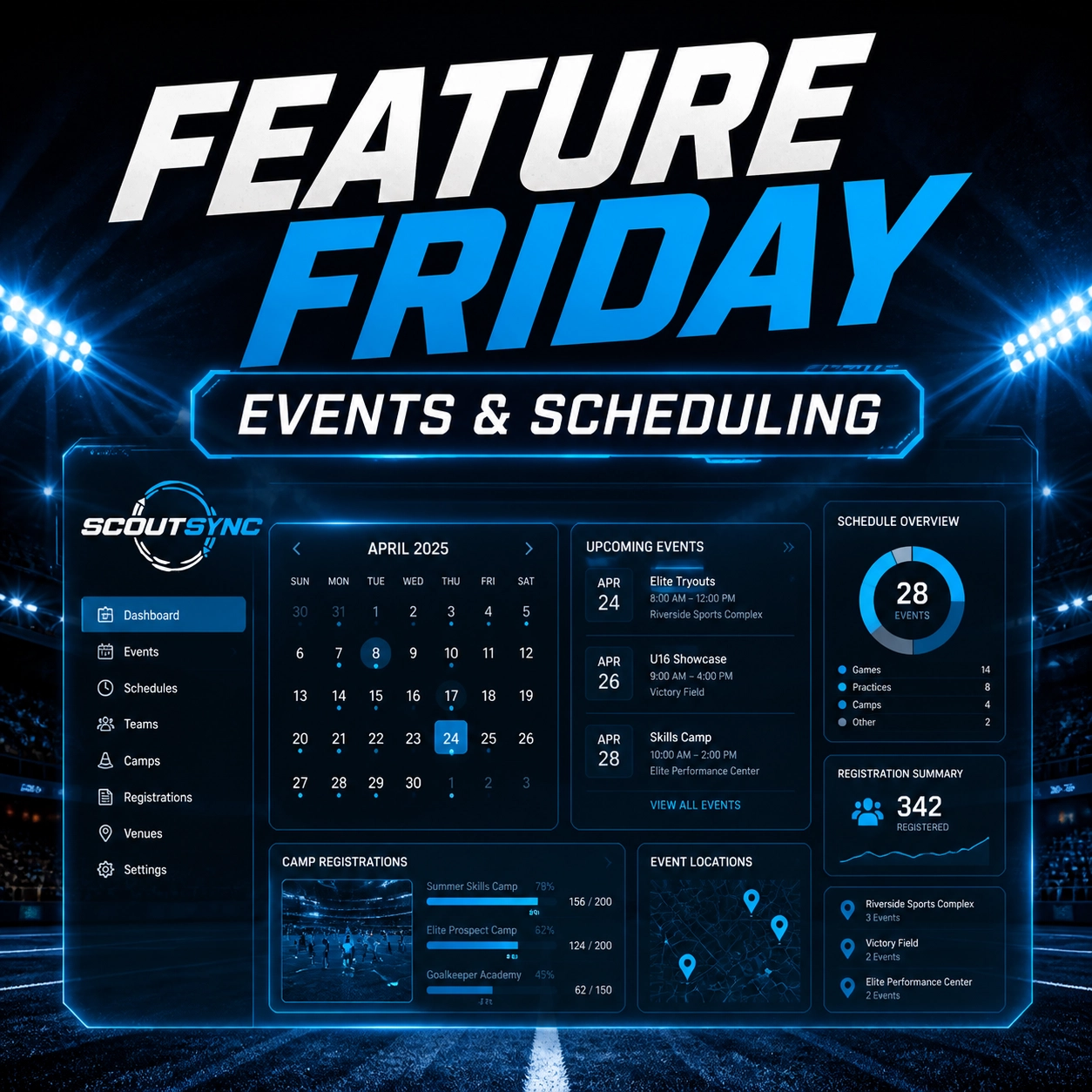
At ScoutSync, we built our Events & Scheduling module to be the single source of truth that connects schedule → roster → athlete profile → performance data. Not just another calendar. The connective tissue your program is missing.
The Chaos vs. Clarity Divide
The Problem: Fragmented Tools
Here's the reality most sports organizations live in and it's worse than you think.
TeamSnap handles scheduling and communication, but caps free rosters at 15 and paywalls RSVP/availability tracking behind Premium. GotSport manages official registration and player cards, but doesn't do day-to-day team scheduling. So clubs run both and TeamSnap's own documentation instructs admins to export data out of one system and manually import it into the other.
SportsEngine processes registration and runs team sites, but draws consistent complaints about notifications that simply don't show up. One coach: "notifications don't show up when they should and you don't know there are messages until you open SportsEngine."
Spond is free and beloved at the grassroots level it saves coaches an average of 2 hours per week on admin tasks, per the company. But it stops at the event. No performance data. No athlete profile depth. No connection to recruiting or combine results.
Perfect Game runs thousands of baseball showcases and combines annually over 9,800 events a year, with registration fees from $100 to $1,000 per entry. Results (60-yard dash, exit velocities) post to a closed PG player profile. A walled garden. Separate from the athlete's team app, club record, or any other platform.
And for combines and tryouts generally? Paper forms attached to pre-event emails. Clipboards and numbered pinnies. Manual check-in. Volunteer chaos.
The Integration Gap They All Share
Every single one of these tools stops at the event. They handle a piece of the puzzle, but nothing connects.
As Mingle Sport puts it: scheduling tools "stop at the event" and don't carry through to substitution tracking, minutes played, stats, or development. As the Futures App articulates: "the player data collected during registration should seed the player profile that coaches use for development tracking... Manual data entry between systems is a common source of errors and lost time."
Registration ≠ team management ≠ athlete performance ≠ combine data.
These remain separate silos. Manual re-entry is the norm. The data does not flow automatically.
Death by a Thousand Apps
This is the single biggest operational problem in sports today. And the data backs it up.
78% of school administrators use 3+ separate systems to manage athletics
ADs lose ~10 hours weekly to administrative inefficiencies
The average sports parent spends ~1 hour per event day on pure logistics driving, communicating, coordinating
Youth sports volunteer hours dropped from 96.5 hours/year (2017) to 70 hours/year (2023) even as demands grow
The sports management software market is valued at $10.84 billion in 2025 and projected to reach $19.15 billion by 2031 with Event Management & Scheduling named as the fastest-growing application segment (Mordor Intelligence)
The market is responding to a real, painful gap. Teams and organizations are desperate for something better than the current stack of separate, siloed tools.
The Solution: ScoutSync Clarity
ScoutSync replaces the friction with a unified, secure platform. We provide a sports intelligence platform where every game, practice, and meeting is tied directly to your Athlete Profiles and where registration data, combine results, and performance data live in the same system as your day-to-day schedule.
No manual export to GotSport. No clipboard check-in for tryouts. No walled garden for combine results.
Schedule ↔ Roster ↔ Athlete Profile ↔ Performance Data ↔ Registration. In one system.

Centralizing the Command Center
The Events & Scheduling module isn't just a digital calendar; it’s a high-performance roster management software for coaches.
Whether you are managing a single high school program or a multi-national federation, you need a searchable database that scales.
Key Capabilities:
Centralized Calendar: View April 2026 at a glance or drill down into a single hour. Toggle between individual schedules, team views, or followed athletes.
Multi-Sport Versatility: Manage football matchups alongside track meets and academic sessions without crossing wires.
Unified Roster Links: Every event is linked to your roster. If an athlete is marked "out" due to injury in the League Intel module, it reflects in your event availability.
Tool Type | The Old Way (Fragmented) | The ScoutSync Way (Unified) |
|---|---|---|
Event Setup | One generic calendar entry for everything | 10 event types with sport-specific fields and behaviors |
Naming | Manual event titles every time | Smart auto-naming for practices and meetings |
Attendance Response | Basic yes/no or text reply chaos | RSVP states + structured decline reasons |
Registration Control | Overbooking, back-and-forth, guesswork | Status gates that control who can register and when |
Calendar Sync | Parents and staff re-enter events by hand | ICS feed tokens sync directly to personal calendars |
Notifications | Same blast to everyone | Auto-selected "also notify" groups by event type |
Closing the Communication Gap with Parents
One of the biggest friction points for any sports organization is the parent-coach dynamic. Parents want to be informed, but they don't want to hunt through emails or look for a PDF link in an SMS thread.
✓ BEST PRACTICE: Use ScoutSync’s direct sync feature to push schedule updates directly to authorized parents and guardians.
When you adjust a practice time or schedule a new camp on ScoutSync, you can choose to notify stakeholders instantly. They see the change in real-time, exactly when they need to be informed. No more "I didn't see the email" excuses.

Strategic Advantage: Managing Camps and Combines
For sports organizations, events like combines and showcases are the lifeblood of the sports recruitment platform. These aren't just dates on a page; they are data-collection opportunities.
With ScoutSync, your events are part of your scouting database for teams. You can track attendance, record performance grading during the event, and have that data sync immediately to the athlete’s permanent profile.
⚡ Quick Win: The 60-Second Event
Stop starting from zero. Create your next combine or camp in under 60 seconds with ScoutSync templates. Use pre-built structures for different sports and levels (NCAA, Semi-Pro, Youth) to ensure your administrative operations never slow down your athletes.
Beyond the Calendar: Event Management That Goes Deeper
This is where ScoutSync separates itself from a basic scheduler. You are not just dropping blocks onto a calendar. You are building events with rules, logic, and role-based workflows that actually match how sports organizations operate.
10 Event Types. 10 Different Workflows.
ScoutSync supports 10 event types:
Game
Practice
Scrimmage
Meeting
Camp
Combine
Showcase
Tournament
Tryout
Other
Each event type has different fields and behaviors. In plain language: a practice is not treated like a camp, and a meeting is not treated like a game.
What this means for you: You get cleaner data, faster setup, and fewer manual workarounds.
Smart Auto-Naming Saves Admin Time
Small detail. Big time-saver.
ScoutSync can automatically name:
Practices as "{Sport} Practice"
Meetings from meeting type + date
That means less typing, better consistency, and a calendar that stays readable for coaches, staff, athletes, and parents.
✓ BEST PRACTICE: Standardized event names make search, reporting, and communication much easier later.
Meeting Tools Built for Real Operations
Meetings are not just blank appointments.
ScoutSync supports meeting-specific controls like:
In-person, virtual, or hybrid meeting formats
Agenda builder for structured discussion points
Attendee management so you know exactly who is expected
Reminder notifications with preset timing options:
at_time
15m
30m
1h
1d
1w
Key takeaway: Your staff meetings, recruiting briefings, compliance reviews, and parent sessions can run with the same structure as your on-field operations.
RSVP That Gives You Actual Signal
Most tools only tell you "yes" or "no." That is not enough.
ScoutSync supports RSVP states:
going
maybe
not_going
And if someone declines, they can choose from 10 preset reason codes instead of sending a vague text or disappearing entirely.
In plain language: you learn why someone cannot attend, not just that they are out.
✓ BEST PRACTICE: Structured decline reasons help you spot patterns fast. Transportation issue. Scheduling conflict. Injury. Eligibility. You can act on that.
Registration Gates That Prevent Admin Mistakes
This is one of the most practical features in the module.
ScoutSync can gate event registration based on status, including:
draft
cancelled
already registered
date TBD
completed
deadline closed
full
role-ineligible
open
That means you do not have to manually police every signup.
What this means for you: You avoid accidental overbooking, duplicate registrations, late entries, and role mismatches before they become a staff headache.
✗ COMMON MISTAKE: Leaving registration fully manual and trying to clean it up later.
Public Registration and Volunteer Links
Not every event participant should need a platform login.
ScoutSync supports:
Public event registration links
Volunteer signup links
Token-based access with no login required
This is especially useful for camps, combines, showcases, tournaments, and community support roles where outside participants need a fast path to register.
Personal Calendar Sync Without the Back-and-Forth
ScoutSync provides ICS calendar feed tokens so parents, staff, and other approved stakeholders can subscribe directly from their personal calendar apps.
In plain language: events update on their phone or laptop calendar automatically.
No retyping. No screenshotting the schedule. No "Can you resend that?"
Smarter Notifications by Event Type
Not every update should hit every person.
ScoutSync uses "also notify" groups that can auto-select based on event type:
Games: coaches + athletes + parents
Practices: narrower groups based on relevance
Meetings: tighter staff or attendee-based communication
This keeps communication targeted instead of noisy.
What this means for you: Better response rates. Less notification fatigue. Fewer people missing the one update that actually mattered.
Quick Checklist: What Better Event Management Looks Like
Use the right event type instead of forcing every activity into one generic template
Let auto-naming keep your calendar standardized
Turn on meeting reminders so staff and families are not guessing
Require structured RSVP responses to get usable attendance data
Use registration gates to stop overbooking before it starts
Share public links when outside users need access
Push ICS feeds to parents and staff for real-world calendar sync
Keep alerts clean with event-type-based notification groups
Implementation Checklist: Moving to Centralized Scheduling
Ready to ditch the spreadsheets? Use this checklist to transition your organization to a more efficient athlete management system.
Audit Your Stack: List every app you currently use to schedule (Google, Monday, HubSpot, etc.).
Centralize the Roster: Import your current athlete profile management data into ScoutSync.
Set Hierarchy: Define who has "Edit" vs. "View" permissions (Coaches, ADs, Scouts).
Sync Parent Portals: Connect parent/guardian accounts to their respective athletes for automated updates.
Template Your Season: Build your "Master Season Template" for recurring practices and meetings.
Key Takeaway: The goal of professional team management is to remove the "noise" so the athletes can perform. Fragmented tools create noise. ScoutSync creates focus.
This Is a Series: Feature Friday at ScoutSync
This is the fourth installment of Feature Friday, our weekly deep dive into what ScoutSync actually does under the hood.
If you missed the earlier ones:
Feature Friday: Roster Management & Depth Charts — Visual roster tools, formation builders, and why the whiteboard era is over.
Feature Friday: Schedule Import — How to bring your entire season calendar into ScoutSync in minutes, not hours.
Feature Friday: Global Athlete Command Center — One dashboard to manage athlete profiles, stats, media, and academic data across your entire organization.
Bookmark the ScoutSync Blog — we drop a new Feature Friday every week.
Stop letting your events fall through the cracks.
Manage your talent, your time, and your future from one single dashboard. Stop the juggling act and start building a legacy of institutional knowledge.
[Book a Demo with ScoutSync Today] https://scoutsync.com/resources/blog